> ## Documentation Index
> Fetch the complete documentation index at: https://docs.letshum.com/llms.txt
> Use this file to discover all available pages before exploring further.
# Widget Overview
> Learn about the Hum widget's capabilities, features, and integration options
# Hum Widget Overview
The Hum widget is a turnkey solution for integrating internet service provider discovery and e-commerce functionality into your website or mobile application. With minimal setup, you can provide your users with address-specific internet plans, pricing, and the ability to order service directly.
 ## What is the Hum Widget?
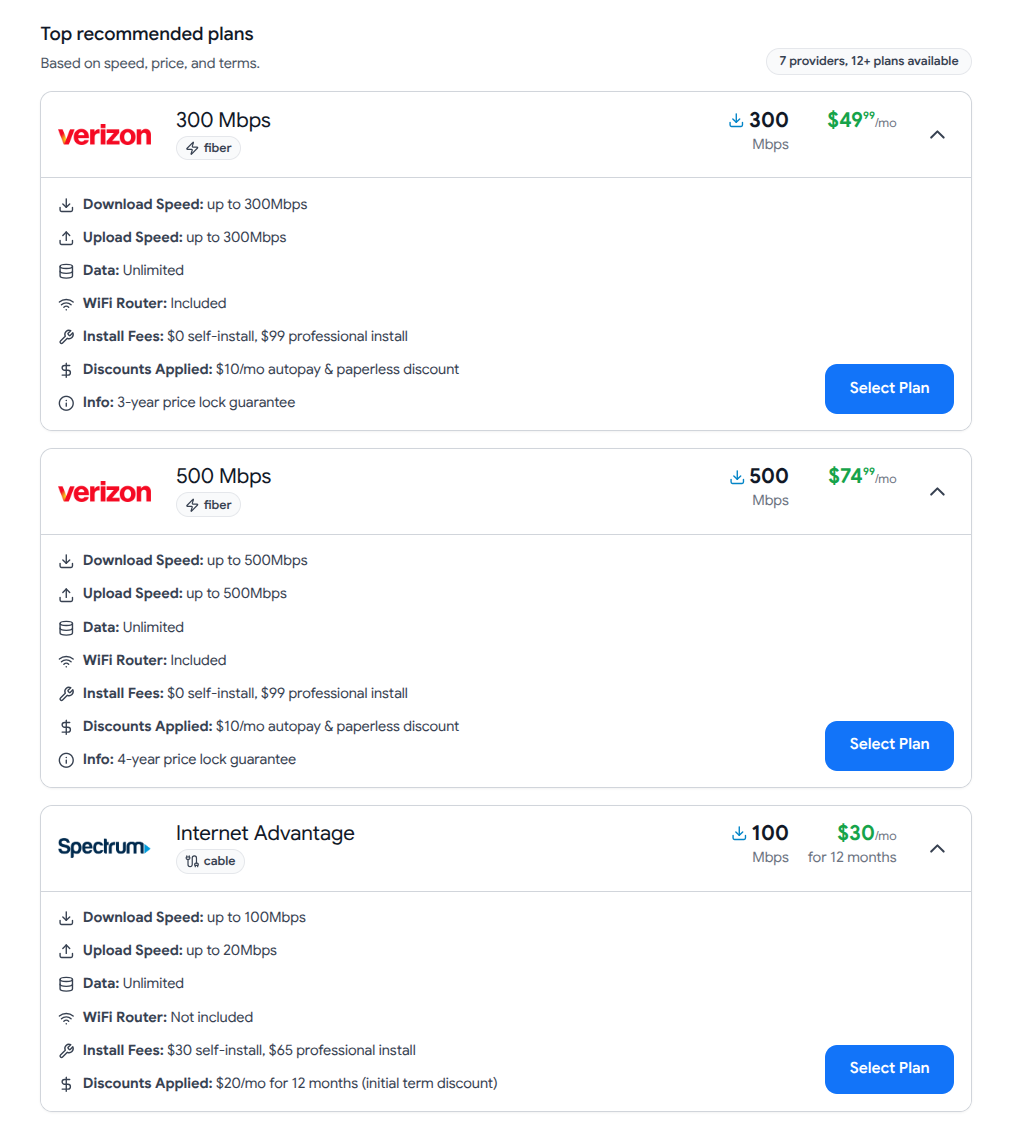
The Hum widget is a fully-featured, embeddable component that enables your users to:
* **Search for internet service** by entering their address
* **Compare plans** from 200+ internet service providers nationwide
* **Filter options** by technology, speed, price, and provider
* **Complete checkout** to order internet service directly
* **Save plans** for later comparison and review
* **View provider details** including contact information and coverage areas
The widget handles all the complexity of provider data, pricing, availability checking, and checkout flows—all you need to do is embed it.
## Key Features
Instant address validation and service availability from 200+ providers
Choose from checkout, summary, or plans layouts to match your use case
Adapts seamlessly to desktop, tablet, and mobile devices
Configure colors and layout to match your brand identity
Complete shopping cart and checkout flow for participating providers
Listen to order completion, plan saves, and other user actions
## Architecture
The Hum widget is built as a React single-page application using client-side rendering. It's designed to be:
* **Performant**: Loads asynchronously without blocking page rendering
* **Lightweight**: Minimal impact on your page load times
* **Secure**: All API communication is encrypted and authenticated
* **Reliable**: Hosted on a global CDN with 99.9% uptime
The widget communicates with the Hum API backend to fetch real-time provider data, validate addresses, and process orders.
## What is the Hum Widget?
The Hum widget is a fully-featured, embeddable component that enables your users to:
* **Search for internet service** by entering their address
* **Compare plans** from 200+ internet service providers nationwide
* **Filter options** by technology, speed, price, and provider
* **Complete checkout** to order internet service directly
* **Save plans** for later comparison and review
* **View provider details** including contact information and coverage areas
The widget handles all the complexity of provider data, pricing, availability checking, and checkout flows—all you need to do is embed it.
## Key Features
Instant address validation and service availability from 200+ providers
Choose from checkout, summary, or plans layouts to match your use case
Adapts seamlessly to desktop, tablet, and mobile devices
Configure colors and layout to match your brand identity
Complete shopping cart and checkout flow for participating providers
Listen to order completion, plan saves, and other user actions
## Architecture
The Hum widget is built as a React single-page application using client-side rendering. It's designed to be:
* **Performant**: Loads asynchronously without blocking page rendering
* **Lightweight**: Minimal impact on your page load times
* **Secure**: All API communication is encrypted and authenticated
* **Reliable**: Hosted on a global CDN with 99.9% uptime
The widget communicates with the Hum API backend to fetch real-time provider data, validate addresses, and process orders.
 ## Layout Options
The widget supports three layout modes to suit different use cases and user experiences:
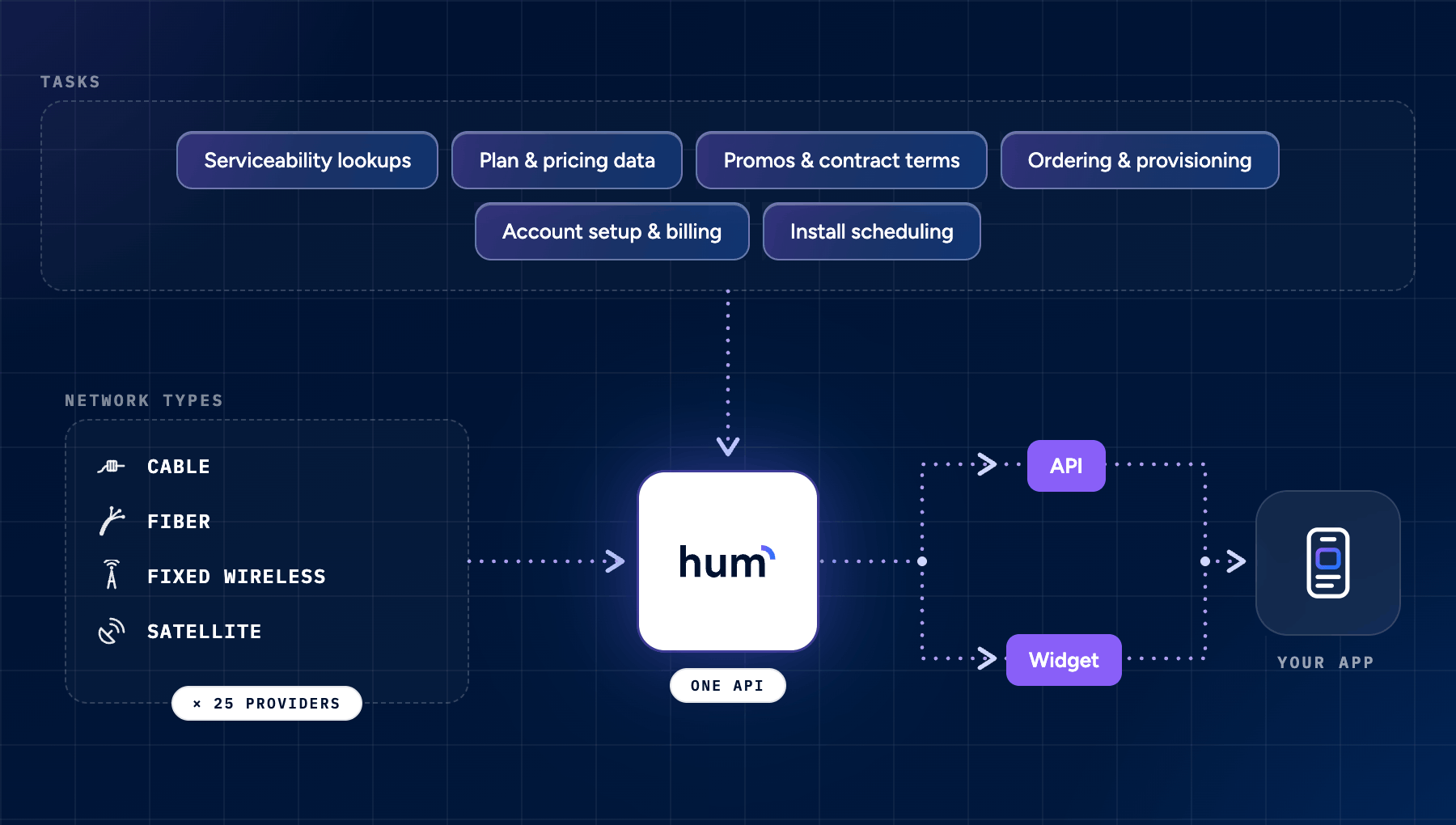
The checkout layout provides a full e-commerce experience with a shopping cart, allowing users to select plans, add-ons, and complete the ordering process.
**Best for:**
* Users actively seeking new internet service
* Dedicated pages that support multi-step flows
* Conversion-focused implementations
* Real estate, mortgage, and relocation apps
**Features:**
* Interactive shopping cart
* Multiple provider selection
* Add-on services (TV, phone)
* Complete checkout flow
* Order confirmation
The summary layout presents available internet service options in a clean, compact table format with links to provider websites.
**Best for:**
* Passive information discovery
* Limited screen space
* Quick provider comparisons
* Property listing websites
## Layout Options
The widget supports three layout modes to suit different use cases and user experiences:
The checkout layout provides a full e-commerce experience with a shopping cart, allowing users to select plans, add-ons, and complete the ordering process.
**Best for:**
* Users actively seeking new internet service
* Dedicated pages that support multi-step flows
* Conversion-focused implementations
* Real estate, mortgage, and relocation apps
**Features:**
* Interactive shopping cart
* Multiple provider selection
* Add-on services (TV, phone)
* Complete checkout flow
* Order confirmation
The summary layout presents available internet service options in a clean, compact table format with links to provider websites.
**Best for:**
* Passive information discovery
* Limited screen space
* Quick provider comparisons
* Property listing websites
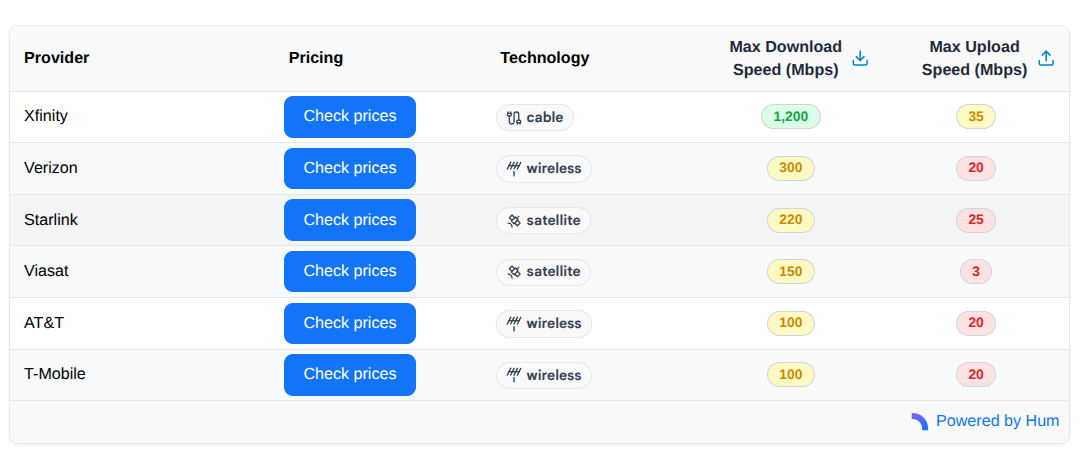 **Features:**
* Compact table view
* Sort by speed, price, provider
* Filter by technology type
* Direct links to providers
* Minimal screen real estate
The plans layout displays provider options as cards with affiliate links, offering a middle ground between checkout and summary layouts.
**Best for:**
* Visual comparisons
* Directing users to provider sites
* Affiliate marketing use cases
* Streamlined user experience
**Features:**
* Compact table view
* Sort by speed, price, provider
* Filter by technology type
* Direct links to providers
* Minimal screen real estate
The plans layout displays provider options as cards with affiliate links, offering a middle ground between checkout and summary layouts.
**Best for:**
* Visual comparisons
* Directing users to provider sites
* Affiliate marketing use cases
* Streamlined user experience
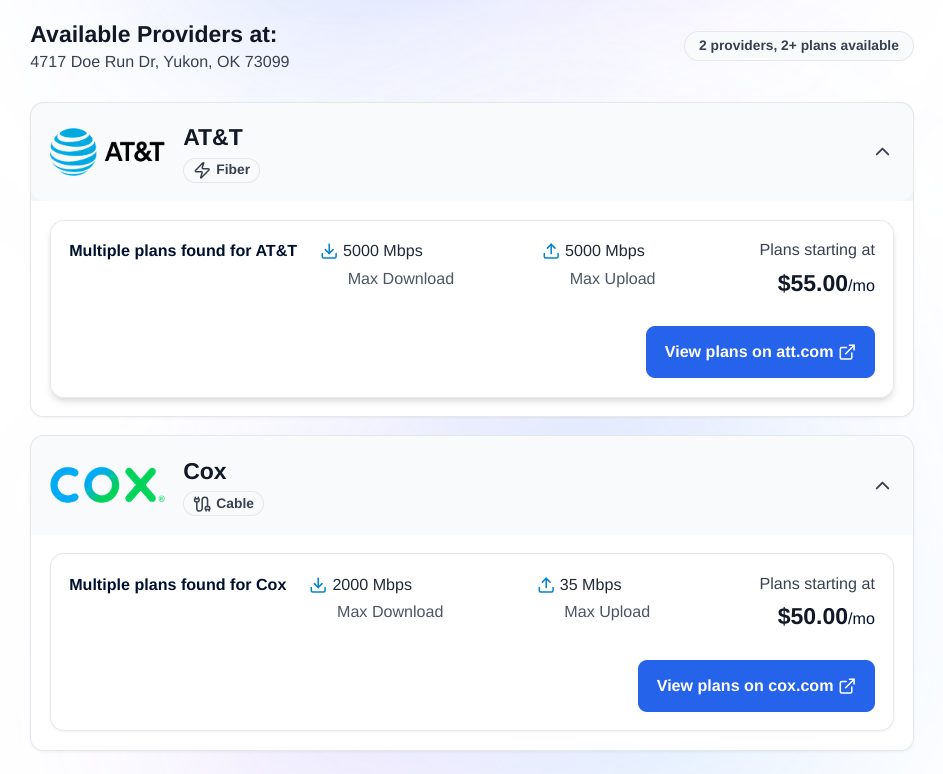 **Features:**
* Card-based design
* Visual plan comparisons
* Provider logos and branding
* Quick filtering options
* Affiliate link tracking
## Integration Methods
Choose the integration method that best fits your technical stack and requirements:
Embed the widget using JavaScript and HTML. Ideal for websites where you control the codebase.
**Best for:** Web applications, landing pages, React/Vue apps
Load the widget via URL in a mobile WebView. Perfect for native and hybrid mobile apps.
**Best for:** iOS, Android, React Native, Flutter apps
Both integration methods provide the same features and user experience—choose based on your technical environment.
## Configuration Options
The Hum widget is highly configurable. All options are optional and have sensible defaults.
### Display & Layout
Controls the visual presentation of internet service results.
**Accepted Values:**
* `"summary"` - Compact table format with affiliate links
* `"checkout"` - Full shopping cart and e-commerce experience (default)
* `"plans"` - Card layout with affiliate links
**Default:** `"checkout"`
Customizes the primary color for buttons and UI elements throughout the widget.
**Format:** Hex color code (e.g., `"#1274f9"`)
**Default:** `"#1274f9"`
The color will be automatically darkened by 10% for hover states to ensure consistent user experience.
Controls whether users can save and unsave internet plans for later comparison.
**Default:** `false`
**When enabled:**
* Save/unsave button appears on plan cards
* Triggers `humPlanSaved` and `humPlanUnsaved` events
* Allows users to bookmark plans for future reference
Enable this feature if you want to track user interest in specific plans or provide a "favorites" list functionality.
### Tracking & Analytics
Identifier for tracking attribution and analytics purposes. Associate widget sessions with specific marketing campaigns, traffic sources, or user segments.
**Default:** `undefined`
Include campaign identifiers like `"Q4-2024-landing-page"` or `"email-campaign-12345"` to track which sources generate the most conversions.
### Filtering & Limiting
Restricts results to specific internet service providers using FCC provider IDs.
**Use cases:**
* Partnership agreements
* White-label implementations
* Regional focus
Use [Get FCC Service Providers](/api-reference/informational/get-fcc-service-providers) to retrieve internet provider IDs programmatically.
Designates one or more providers to display more prominently as top plan recommendations using FCC provider IDs.
**Accepted Values:** Single provider ID string or array of provider ID strings
**Impact:** Featured at the top of search results with visual prominence
Filters results to show only specific connection technology types.
**Valid options:** `Fiber`, `Cable`, `Wireless`, `Satellite`, `DSL`, `Other`
Combine with `limitProviders` for precise control over displayed plans.
### Customer Data Pre-population
Pre-populates customer information in the shopping cart to streamline checkout.
**Available fields:**
* `firstName` - Customer's first name
* `lastName` - Customer's last name
* `email` - Customer's email address
* `phoneNumber` - Customer's phone number
Pre-populating customer data can increase conversion rates by reducing friction in the checkout flow.
## Address Data Format
The widget expects address data in a specific JSON format:
```json theme={null}
{
"street1": "1001 Woodward Ave",
"street2": "Suite 500",
"city": "Detroit",
"state": "MI",
"zip": "48226",
"latitude": 42.3317,
"longitude": -83.0479
}
```
### Required Fields
Primary street address containing street number and name.
ZIP code in 5 or 9-digit format (12345 or 12345-6789).
### Optional Fields
Secondary address information (apartment, suite, unit number).
City name. Recommended for improved address match quality.
Two-letter US state code (e.g., "MI" for Michigan). Recommended for improved address match quality.
Latitude coordinate for improved performance and reduced latency.
Longitude coordinate for improved performance and reduced latency.
Both latitude and longitude must be provided together. If only one is provided, the widget will return an error.
## Common Use Cases
Help homebuyers and renters understand internet options before making decisions.
**Implementation tips:**
* Use summary layout for listing pages
* Pre-populate address from property data
* Track by property ID with `campaignId`
Provide comprehensive internet service information as part of relocation assistance.
**Implementation tips:**
* Use checkout layout for conversion
* Integrate with move-in date scheduling
* Pre-populate customer data from profiles
Assist mortgage applicants and homebuyers in planning their move.
**Implementation tips:**
* Embed in post-approval flows
* Use property address from loan application
* Track by application ID
Help tenants find and set up internet service for their new homes.
**Implementation tips:**
* Limit to preferred providers via partnership
* Use property's address by default
* Brand with property management colors
Add value to listings by showing available internet services.
**Implementation tips:**
* Use summary layout for compact display
* Cache results by address
* Display alongside other amenities
## Getting Started
Ready to integrate the Hum widget? Choose your integration method:
Step-by-step guide for embedding the widget with JavaScript and HTML
URL-based integration guide for mobile WebView applications
Learn how to listen for events and handle user actions
Build custom integrations using the Hum API directly
## Support
Contact our team for API keys, integration assistance, and technical support
**Features:**
* Card-based design
* Visual plan comparisons
* Provider logos and branding
* Quick filtering options
* Affiliate link tracking
## Integration Methods
Choose the integration method that best fits your technical stack and requirements:
Embed the widget using JavaScript and HTML. Ideal for websites where you control the codebase.
**Best for:** Web applications, landing pages, React/Vue apps
Load the widget via URL in a mobile WebView. Perfect for native and hybrid mobile apps.
**Best for:** iOS, Android, React Native, Flutter apps
Both integration methods provide the same features and user experience—choose based on your technical environment.
## Configuration Options
The Hum widget is highly configurable. All options are optional and have sensible defaults.
### Display & Layout
Controls the visual presentation of internet service results.
**Accepted Values:**
* `"summary"` - Compact table format with affiliate links
* `"checkout"` - Full shopping cart and e-commerce experience (default)
* `"plans"` - Card layout with affiliate links
**Default:** `"checkout"`
Customizes the primary color for buttons and UI elements throughout the widget.
**Format:** Hex color code (e.g., `"#1274f9"`)
**Default:** `"#1274f9"`
The color will be automatically darkened by 10% for hover states to ensure consistent user experience.
Controls whether users can save and unsave internet plans for later comparison.
**Default:** `false`
**When enabled:**
* Save/unsave button appears on plan cards
* Triggers `humPlanSaved` and `humPlanUnsaved` events
* Allows users to bookmark plans for future reference
Enable this feature if you want to track user interest in specific plans or provide a "favorites" list functionality.
### Tracking & Analytics
Identifier for tracking attribution and analytics purposes. Associate widget sessions with specific marketing campaigns, traffic sources, or user segments.
**Default:** `undefined`
Include campaign identifiers like `"Q4-2024-landing-page"` or `"email-campaign-12345"` to track which sources generate the most conversions.
### Filtering & Limiting
Restricts results to specific internet service providers using FCC provider IDs.
**Use cases:**
* Partnership agreements
* White-label implementations
* Regional focus
Use [Get FCC Service Providers](/api-reference/informational/get-fcc-service-providers) to retrieve internet provider IDs programmatically.
Designates one or more providers to display more prominently as top plan recommendations using FCC provider IDs.
**Accepted Values:** Single provider ID string or array of provider ID strings
**Impact:** Featured at the top of search results with visual prominence
Filters results to show only specific connection technology types.
**Valid options:** `Fiber`, `Cable`, `Wireless`, `Satellite`, `DSL`, `Other`
Combine with `limitProviders` for precise control over displayed plans.
### Customer Data Pre-population
Pre-populates customer information in the shopping cart to streamline checkout.
**Available fields:**
* `firstName` - Customer's first name
* `lastName` - Customer's last name
* `email` - Customer's email address
* `phoneNumber` - Customer's phone number
Pre-populating customer data can increase conversion rates by reducing friction in the checkout flow.
## Address Data Format
The widget expects address data in a specific JSON format:
```json theme={null}
{
"street1": "1001 Woodward Ave",
"street2": "Suite 500",
"city": "Detroit",
"state": "MI",
"zip": "48226",
"latitude": 42.3317,
"longitude": -83.0479
}
```
### Required Fields
Primary street address containing street number and name.
ZIP code in 5 or 9-digit format (12345 or 12345-6789).
### Optional Fields
Secondary address information (apartment, suite, unit number).
City name. Recommended for improved address match quality.
Two-letter US state code (e.g., "MI" for Michigan). Recommended for improved address match quality.
Latitude coordinate for improved performance and reduced latency.
Longitude coordinate for improved performance and reduced latency.
Both latitude and longitude must be provided together. If only one is provided, the widget will return an error.
## Common Use Cases
Help homebuyers and renters understand internet options before making decisions.
**Implementation tips:**
* Use summary layout for listing pages
* Pre-populate address from property data
* Track by property ID with `campaignId`
Provide comprehensive internet service information as part of relocation assistance.
**Implementation tips:**
* Use checkout layout for conversion
* Integrate with move-in date scheduling
* Pre-populate customer data from profiles
Assist mortgage applicants and homebuyers in planning their move.
**Implementation tips:**
* Embed in post-approval flows
* Use property address from loan application
* Track by application ID
Help tenants find and set up internet service for their new homes.
**Implementation tips:**
* Limit to preferred providers via partnership
* Use property's address by default
* Brand with property management colors
Add value to listings by showing available internet services.
**Implementation tips:**
* Use summary layout for compact display
* Cache results by address
* Display alongside other amenities
## Getting Started
Ready to integrate the Hum widget? Choose your integration method:
Step-by-step guide for embedding the widget with JavaScript and HTML
URL-based integration guide for mobile WebView applications
Learn how to listen for events and handle user actions
Build custom integrations using the Hum API directly
## Support
Contact our team for API keys, integration assistance, and technical support